The Email Segmentation System That Turned My Broadcast Mess Into a Revenue Machine
Feb 16, 2026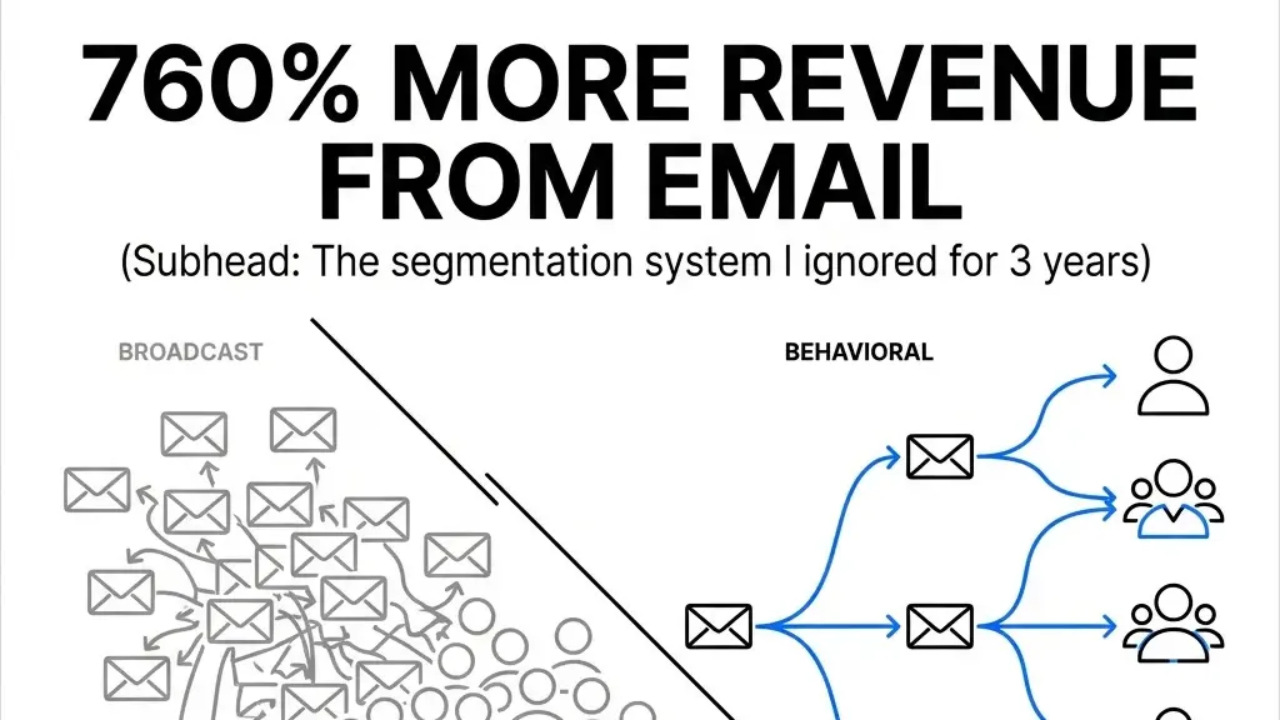
TL;DR: I wasted three years sending identical emails to everyone on my list. When I switched to behavioral segmentation (sending different messages based on what people do), revenue jumped 760%. This complete guide shows you how to build the same system in HighLevel with behavioral triggers, automated sequences, and AI-assisted copywriting.
Segmented email campaigns deliver:
-
760% increase in email revenue vs. broadcasts
-
7.04% average conversion rates (double non-segmented)
-
152% higher click-through rates with behavioral triggers
-
5x more revenue per email from triggered sequences
-
Cart abandonment recovery of 29% when timed properly
For three years, I sent the same email to everyone.
New subscribers got identical messages as six-month veterans. Active readers got treated like ghosts who never opened anything. Cart abandoners received the same lazy follow-up as repeat buyers.
Results? Mediocre.
Then something shifted. Not a new tool. Not a template. A mental flip: stop broadcasting, start responding to behavior.
Numbers don't lie. Segmented campaigns produce a 760% increase in email revenue. Segmented emails hit 7.04% average conversion rates, doubling broadcasts.
Here's what those statistics hide: implementation is where people quit.
They read about segmentation. They get the concept. They own the tools. The gap between knowing and doing? That's where they freeze.
This is the complete walkthrough I needed three years ago. You're getting it today.
Why Your Email Strategy Feels Like Shouting Into a Void
You've got the platform. You've got the list. You hit send. Crickets.
Problem? You're treating everyone the same.
Someone who joined yesterday has different needs than someone reading for six months. A customer who bought last week needs different messaging than someone who never purchased.
Behavioral triggers generate 152% higher click-through rates and deliver 5x the revenue per email compared to broadcasts. Cart abandonment emails recover 29% of lost sales when timed right.
Shift from broadcast to behavioral? Measurably better. Dramatically better.
People stall thinking segmentation is complicated. It's not. It's different from what you're doing.
What this means for you: Stress ends when you respond to what people do. Relief comes when opens climb, clicks multiply, revenue follows behavior.
How to Make Segmentation Work (Four Steps)
Tested across multiple businesses. Pattern holds.
Step 1: Map Your Customer Journey
Before segmenting, understand the path people take. Not your ideal path. Their actual path.
Three stages:
• Awareness - They just found you
• Consideration - They're evaluating whether you're right for them
• Decision - They're ready to buy (or they've already bought)
Different messaging for each stage. Awareness gets education. Consideration gets proof. Decision gets a clear next step.
Not AIDA repackaged. This is watching what people do. Responding accordingly.
Bottom line: Match messages to journey stages. People feel understood, not sold to.
Step 2: Identify Your Behavioral Triggers
Triggers signal intent. They show what someone wants without asking.
Triggers working across businesses:
• Email opens (they're engaged)
• Link clicks (they're interested in specific topics)
• Cart additions (they're considering a purchase)
• Cart abandonment (they got distracted or had questions)
• Purchase completion (they're now customers)
• Time-based inactivity (they've gone quiet)
Each trigger launches a sequence. Not a single email. A sequence guiding them to the next step.
Over 75% of email revenue comes from triggered emails, per the Direct Marketing Association. This isn't minor optimization. This is where most results come from.
Key insight: Behavioral triggers transform email from guesswork into precision. You're responding to demonstrated interest, not hoping someone cares.
Step 3: Build Your Segmentation Structure
Most people overcomplicate this. They build 47 segments and drown.
Five core segments:
1. New Subscribers (0-7 days)
2. Engaged Prospects (opened 3+ emails in last 30 days, no purchase)
3. Cart Abandoners (added to cart, didn't complete purchase)
4. Active Customers (purchased in last 90 days)
5. Inactive Subscribers (no opens in 60+ days)
Set up once. Runs forever.
Step 4: Create Segment-Specific Sequences
Each segment needs a sequence speaking to where they are.
New Subscriber Sequence (5 emails over 7 days):
• Welcome + set expectations
• Your origin story (why you do this)
• Your best content/resource
• Social proof (testimonials, case studies)
• Clear offer with deadline
Cart Abandonment Sequence (3 emails over 3 days):
• Reminder (what they left behind)
• Address objections (common questions/concerns)
• Urgency + incentive (limited-time discount or bonus)
Re-engagement Sequence (3 emails over 10 days):
• "Are you still interested?" (direct question)
• Your best recent content (value without asking)
• Final notice (last chance to stay subscribed)
Average automated flow open rate: 48.57%. Top performers: 65.74%. Automation performs better.
Framework recap: Map journey. Identify triggers. Build five segments. Create sequences. Scattered effort becomes systematic revenue.
The HighLevel Implementation Walkthrough
Theory without execution is worthless. Here's how to build this in HighLevel.
Setting Up Your First Behavioral Trigger
Navigate to Automation → Workflows → Create New Workflow
Name it clearly. "Cart Abandonment - 3 Day Sequence" tells you exactly what it does six months from now.
Choose your trigger:
• Tag Applied (when someone gets tagged as "cart-abandoned")
• Form Submitted (when someone fills out a specific form)
• Opportunity Stage Changed (when a deal moves to a specific stage)
For cart abandonment, you'll use "Tag Applied" with the tag "cart-abandoned"
Build the sequence:
1. Wait 1 hour (give them time to complete purchase)
2. Send Email 1 - "You left something behind"
3. Wait 24 hours
4. Send Email 2 - "Questions about [product]?"
5. Wait 24 hours
6. Send Email 3 - "Last chance: 10% off [product]"
Add conditional logic:
After each email, add a condition: "If tag 'customer' is applied, exit workflow"
This stops abandonment emails after purchase. Simple. Works.
Creating Segment-Based Broadcasts
Not everything needs automation. Sometimes you need a one-time message to a specific segment.
Marketing → Campaigns → Create Campaign
Instead of sending to "All Contacts," filter by:
• Tags (engaged, customer, inactive)
• Custom fields (purchase history, interests)
• Activity (opened last email, clicked specific link)
This is where personalization multiplies results. Personalized emails deliver up to 6x higher transaction rates. Brands that personalize subject lines see 26% higher open rates.
The AI Copywriting Integration
AI writes segment-specific copy when you feed it context.
I use a simple prompt structure:
"Write an email for [segment] who [specific behavior]. They need [specific outcome]. Tone: [your brand voice]. Include [specific element]."
Example:
"Write an email for cart abandoners who added [product] but didn't complete purchase. They need reassurance about [common objection]. Tone: direct, helpful, no hype. Include a 10% discount code."
The best AI copywriting results come from OhJoy when you give it specific context about your audience and their current state.
49% of marketers now use generative AI for email copy creation. The number using AI-powered image generation has increased by 340% in the last year. This trend is accelerating now, not in the future.
Implementation truth: HighLevel gives you the tools. Behavioral triggers give you the timing. AI gives you speed. Combined, you're building a system responding to what people do, not guessing what they want.
Real Examples: What This Looks Like in Different Business Types
E-commerce Store
Segment: Recent purchasers
Trigger: Purchase completed
Sequence:
• Day 1: Order confirmation + what to expect
• Day 3: "How's [product] working for you?"
• Day 7: Related product recommendations
• Day 14: Request review + referral incentive
E-commerce brands sending automated campaigns see up to 320% more revenue per email compared to one-off newsletters.
Service Business
Segment: Consultation booked, not completed
Trigger: Calendar event created, no show
Sequence:
• Day 1: "We missed you" + reschedule link
• Day 3: Case study relevant to their industry
• Day 5: "Last chance to reschedule" + limited availability
Digital Products
Segment: Course purchased, low engagement
Trigger: No login in 7 days after purchase
Sequence:
• Day 7: "Getting started with [course]"
• Day 10: Quick win tutorial (easiest module)
• Day 14: Student success story
• Day 21: "Need help?" + support resources
B2B/SaaS
Segment: Trial users, specific feature unused
Trigger: 5 days into trial, feature X not activated
Sequence:
• Day 5: "Unlock [feature] in 3 minutes"
• Day 7: Video walkthrough of feature
• Day 10: Case study showing ROI of feature
• Day 12: "Questions about [feature]?" + calendar link
Pattern across industries: Trigger on behavior. Sequence based on intent. Every business type benefits from watching what people do and responding accordingly.
The Metrics That Actually Matter
Skip vanity metrics. Track these:
Open Rate by Segment
Compare segments against each other. Your engaged segment should have 40%+ open rates. If it doesn't, your segmentation criteria needs adjustment.
Click-Through Rate by Sequence
Which sequences drive action? Which ones fall flat? Double down on what works. Kill what doesn't.
Conversion Rate by Trigger
Which behavioral triggers lead to purchases? Cart abandonment should convert at 5-10%. New subscriber sequences should convert at 2-5%.
Revenue Per Email by Segment
This is the number that matters most. Customers should generate 10-20x more revenue per email than prospects. If they don't, you're not nurturing them properly.
Time to Purchase by Segment
How long does it take different segments to buy? This tells you how long your sequences should be.
The average email marketing ROI is between $36 and $40 for every dollar spent. Retail and e-commerce businesses see the highest ROI at $45. Companies using proper segmentation and automation achieve 63x ROI.
Metrics matter: Track open rates by segment, click-through by sequence, conversion by trigger, revenue per email, and time to purchase. These numbers tell you where to double down and what to kill.
Common Mistakes That Kill Segmentation Results
Mistake 1: Too Many Segments Too Soon
Five segments. Master those. Then expand. Complexity without execution? Planning.
Mistake 2: Ignoring the Inactive Segment
Inactive subscribers cost you money. They hurt deliverability. Re-engage them or remove them.
Mistake 3: Set-It-and-Forget-It Mentality
Automation doesn't mean abandonment. Review your sequences monthly. Update copy. Test new approaches. What worked last quarter might not work this quarter.
Mistake 4: Generic Personalization
First names aren't personalization. Specific behavior is. "You clicked our pricing page" beats "Hey [FirstName]" every time.
Mistake 5: No Exit Conditions
Always include exit conditions. Someone buys? Exit cart abandonment immediately. Someone unsubscribes? Exit all sequences.
Common thread: These mistakes share one cause. You're either overcomplicating at the start or underinvesting in maintenance. Start simple. Stay engaged with your sequences.
What to Do Right Now
You don't need the entire system today. Start with one segment. One trigger. One sequence.
This week:
Pick your highest-value segment. For most businesses, that's cart abandoners or new subscribers.
This month:
Build and launch one automated sequence. Three emails. Simple triggers. Clear exit conditions.
This quarter:
Add two more segments. Refine your first sequence based on real data. Start testing different approaches.
The gap between knowing and doing? Where people stay stuck. You've got tools. You've got knowledge. Execution is the missing piece.
Sending 5-8 emails per month provides the highest ROI, averaging $48 per $1 spent. But those emails need to go to the right people at the right time with the right message.
Segmentation gives you more results from the work you're already doing. Not more work.
Question isn't whether segmentation works. Data proves it. Question is whether you'll implement or keep broadcasting and hoping.
I spent three years doing it wrong. You don't have to.
Frequently Asked Questions
What is email segmentation and why does it matter?
Email segmentation means sending different messages to different groups based on their behavior or characteristics. Segmented campaigns produce 760% more revenue than broadcasts because people respond better to messages matching where they are in their journey.
How many email segments should I start with?
Start with five core segments: New Subscribers (0-7 days), Engaged Prospects (3+ opens, no purchase), Cart Abandoners, Active Customers (purchased in 90 days), and Inactive Subscribers (60+ days no opens). Master these before expanding.
What are behavioral triggers in email marketing?
Behavioral triggers are automated responses to specific actions. When someone abandons a cart, opens three emails in a row, or goes inactive for 60 days, your system automatically sends them a relevant sequence. Triggered emails generate 75% of email revenue.
How long should my automated email sequences be?
Cart abandonment: 3 emails over 3 days. New subscribers: 5 emails over 7 days. Re-engagement: 3 emails over 10 days. Length depends on the segment and how fast they typically convert.
How do I set up email segmentation in HighLevel?
Go to Automation, then Workflows, then Create New Workflow. Choose your trigger (Tag Applied, Form Submitted, etc.), build your email sequence with wait steps between messages, and add exit conditions so people leave the workflow when they convert.
Should I use AI to write my segmented emails?
AI works when you give it context. Tell it the segment, their behavior, what they need, and your brand tone. 49% of marketers use AI for email copy. The key is feeding it specific information about where your audience is.
What metrics should I track for segmented campaigns?
Track open rate by segment (engaged should hit 40%+), click-through by sequence, conversion rate by trigger (cart abandonment: 5-10%, new subscribers: 2-5%), revenue per email by segment, and time to purchase. These show what's working.
How often should I review my email sequences?
Monthly. Check performance. Update copy. Test new approaches. Automation means set it up once, not ignore it forever. What worked last quarter might not work this quarter.
Key Takeaways
-
Segmented email campaigns deliver 760% more revenue than broadcasts because messages match where people are in their journey
-
Start with five segments: New Subscribers, Engaged Prospects, Cart Abandoners, Active Customers, and Inactive Subscribers
-
Behavioral triggers generate 75% of email revenue by responding to demonstrated intent instead of guessing
-
Build sequences in HighLevel using Automation Workflows with clear triggers, timed messages, and exit conditions
-
Track metrics that matter: open rates by segment, conversion rates by trigger, and revenue per email by segment
-
AI speeds up copywriting when you feed it specific context about the segment, behavior, and desired outcome
-
Review sequences monthly to update copy, test approaches, and double down on what works
Your next step: Pick one segment this week. Build one sequence this month. Refine based on data this quarter. The gap between knowing and doing closes when you start with one trigger, one sequence, one segment. You've got this system now. Time to execute.
Join GeekOutFridays Mastermind Club with this Special $7 Trial Offer.
Stay connected with news and updates!
Join our mailing list to receive the latest news and updates from our team.
Don't worry, your information will not be shared.
We hate SPAM. We will never sell your information, for any reason.